Application launch
Open software “Terra AR” on the iPad
Configuration of application and Terra
Choose one of the four modules (picture 1):

Picture 1. Modules of application
- Satellites and their orbits;
- Earth remote sensing (ERS);
- Earth’s magnetic field;
- Keplerian elements and another orbit’s parameters.
Scan Terra
To calibrate the application you should tap five times on the up side of the screen and you wiil see axes (red, green and blue). To move axis correctly, take the end of an axis in the necessary direction.
To put the station in a right position, move the slider below the screen and turn around the station in range from 0 to 360 degrees.
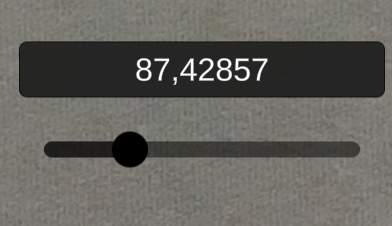
Picture 2. Setting the position of the receiving station
Functionality of operation mode
Satellites and their orbits
Visualization of satellites in real time nearby Terra
- For satellites with a height more than 5000 km shows the ground track of an orbit and the orbit;
- Displaying of the name and coordinates of the satellite (LLA);
- There is timestamp on the orbit/ the satellite’s flight track;
- The view of the satellites (a signal area);
- Scrolling time for satellite’s location during a day;
- Displaying of the receiving station by the location (with a name);
- There is an opportunity to save chosen satellites by ID. For chosen satellites the app works without internet connection.
Earth remote sensing
Visualization of Earth remote sensing:
- Visualization of the spacecraft;
- Visualization of the scanning line;
- Visualization of the dayside and the nightside of the planet.
Earth's magnetic field
Visualization of the following parameters:
- Shape of the field;
- Axis of the magnetic field;
- Axis of rotation of the Earth;
- South Atlantic anomaly;
- The Van Allen radiation belt.
The Keplerian elements of the orbit and another orbit’s parameters:
Visualization of the Keplerian elements of the orbit:
- Semi-major axis;
- Inclination;
- The Ascending Node;
- Eccentricity;
- For 0 < ε < 1 – perigee and apogee (pericenter, apocenter);
- Argument of the pericenter (or the longitude of the pericenter);
- A true anomaly.
Visualization of the basic types of orbits:
- Circular;
- Elliptical;
- Parabola;
- Hyperbola;
- Sun-synchronous;
- Polar;
- Molniya.
For more information about every unit there is FAQ button on the left top side of the screen.

Picture 3. FAQ button
This application works with internet connection.